Scaling Node.js Applications
Strategies for Scaling Node.js Applications
I am a developer from India. I am passionate to contribute to the tech community through my writing. Currently i am in my Graduation in Computer Application.
Welcome to Day 23 of our Node.js Zero to 1! Blog Series🎉🎉
Scaling a Node.js application is essential to ensure it can handle increased traffic, provide high availability, and maintain performance as your user base grows. Scaling involves both horizontal and vertical strategies, understanding scalability challenges, implementing load balancing, using clustering, and adopting microservices architecture.
Understanding Scalability Challenges
Scaling Node.js applications can be challenging due to its single-threaded, event-driven architecture. While Node.js is highly efficient at handling asynchronous operations, it may face bottlenecks when processing CPU-intensive tasks. Understanding these challenges is key to implementing effective scaling solutions.
Single-Threaded Nature:
- Node.js uses a single-threaded event loop, making it efficient for I/O-bound tasks but potentially limited for CPU-bound tasks like image processing or heavy computations.
Event Loop Blocking:
- If a function blocks the event loop, it can delay the processing of other incoming requests, leading to slower response times and potentially crashing the application.
Memory Constraints:
- Node.js applications run in a single process, which is limited by the amount of memory available to that process. As the application scales, memory management becomes crucial.
Concurrency:
- Node.js handles concurrency through non-blocking I/O operations, but when scaling across multiple CPU cores, you need strategies like clustering or worker threads.
Load Balancing Strategies
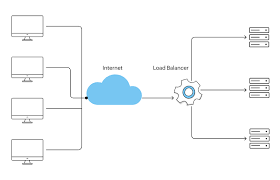
Load balancing is a critical component of scaling, as it distributes incoming network traffic across multiple servers or processes to ensure no single server or process becomes overwhelmed.
Round Robin Load Balancing:
- This is one of the simplest forms of load balancing, where requests are distributed in a circular order across all available servers. While easy to implement, it may not account for the current load on each server.
Least Connections Load Balancing:
- Requests are directed to the server with the fewest active connections, ensuring that no server is disproportionately loaded.
IP Hash Load Balancing:
- The client’s IP address determines which server handles the request. This method helps maintain session persistence, ensuring that requests from the same client are routed to the same server.
Sticky Sessions:
- Sticky sessions, also known as session affinity, ensure that a user’s requests are always directed to the same server. This is crucial for applications that store session data locally rather than in a shared database.
Load Balancing Tools:
- Tools like Nginx, HAProxy, and AWS Elastic Load Balancing (ELB) can be used to implement load balancing in production environments.
Horizontal Scaling with Clustering
Horizontal scaling involves adding more instances of your application to handle increased load. In Node.js, this can be achieved through clustering.
Clustering in Node.js:
- Clustering allows you to create multiple instances (workers) of your Node.js application, each running on a different CPU core. These instances share the same port, and an internal load balancer distributes incoming requests among them.
    const cluster = require('cluster');
    const http = require('http');
    const numCPUs = require('os').cpus().length;

    if (cluster.isMaster) {
        // Fork workers
        for (let i = 0; i < numCPUs; i++) {
            cluster.fork();
        }

        cluster.on('exit', (worker, code, signal) => {
            console.log(`Worker ${worker.process.pid} died`);
        });
    } else {
        // Workers can share any TCP connection
        http.createServer((req, res) => {
            res.writeHead(200);
            res.end('Hello World\n');
        }).listen(8000);
    }
- In this example, the master process forks worker processes equal to the number of CPU cores available. Each worker handles incoming requests independently.
Handling Worker Failures:
Implement logic to handle worker failures and automatically restart them to maintain availability.
  cluster.on('exit', (worker, code, signal) => {
      console.log(`Worker ${worker.process.pid} died. Restarting...`);
      cluster.fork();
  });
Benefits of Clustering:
Improved Performance: By utilizing all CPU cores, clustering can significantly improve the performance of your application.
Fault Tolerance: If one worker crashes, others can continue handling requests, providing fault tolerance.
Using Microservices Architecture
As your application grows, adopting a microservices architecture can help manage complexity and improve scalability.
What are Microservices?:
- Microservices are an architectural style where an application is composed of small, independent services that communicate over a network. Each service is responsible for a specific functionality, such as user authentication, payment processing, or order management.
Benefits of Microservices:
Scalability: Each service can be scaled independently based on its load and resource requirements.
Fault Isolation: A failure in one service doesn’t necessarily bring down the entire application, improving overall reliability.
Technology Diversity: Each microservice can be developed using the best-suited technology stack, allowing teams to choose the right tools for the job.
Designing Microservices:
Service Boundaries: Clearly define the boundaries of each microservice to ensure they are cohesive and loosely coupled.
API Gateway: Use an API gateway to manage requests between clients and microservices. The gateway can handle tasks like load balancing, rate limiting, and security.
Communication: Choose appropriate communication protocols between microservices, such as REST, gRPC, or message queues.
Example: Breaking Down a Monolithic Application:
Imagine a monolithic e-commerce application with modules for users, products, orders, and payments. In a microservices architecture, each of these modules would become a separate microservice, deployed independently.
Users Service: Handles user registration, authentication, and profile management.
Products Service: Manages product listings, search, and inventory.
Orders Service: Handles order placement, tracking, and history.
Payments Service: Manages payment processing, refunds, and transaction history.
Deployment Strategies:
Use containerization tools like Docker to package microservices into containers, making them easier to deploy and scale.
Orchestrate containers using Kubernetes or Docker Swarm to automate deployment, scaling, and management of containerized applications.
Challenges of Microservices:
Increased Complexity: Microservices introduce network overhead and complexity in managing inter-service communication.
Data Management: Each microservice may have its own database, leading to challenges in data consistency and integrity.
Deployment Overhead: Managing and deploying multiple microservices requires robust DevOps practices and tools.
Conclusion
Scaling Node.js applications is a multifaceted process that requires careful planning and execution. By understanding the scalability challenges, implementing load balancing strategies, leveraging horizontal scaling with clustering, and adopting a microservices architecture, you can build a Node.js application that is resilient, performant, and capable of handling increased demand.
In the final post of this series, we'll explore how to use Docker with Node.js. Stay tuned!


